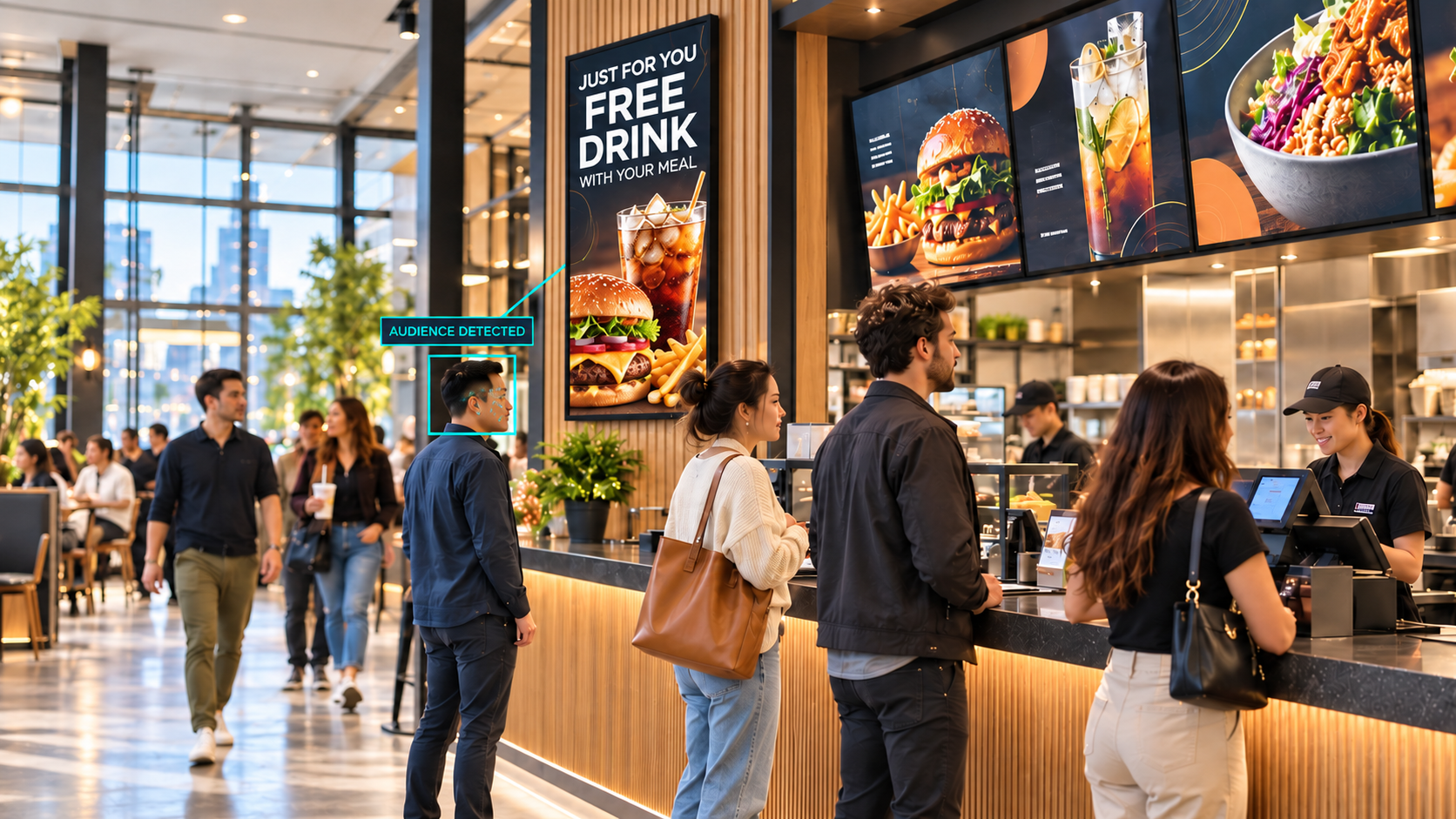
AI computer vision for physical locations
AI Computer Vision

Your Cameras Are Already Watching. Now Make Them Work.

The cameras in your locations are capturing real-time signals every hour of every day. AI computer vision turns those passive signals into decisions: what to display, when to alert staff, and how to respond to what is actually happening in your space right now. Better guest experience. Faster operational response. And measurable growth built on intelligence that is already in the room.

Get a Free Assessment Explore AI Enablement

What Your Locations Know That You Are Not Using

Most physical locations have security cameras. Almost none of them use those cameras as business intelligence tools. Here is what that gap costs.

Your displays run on a schedule, not on reality

Static content rotations and daypart schedules were set up when the system launched and rarely change. They have no idea how many people are in line, how long they have been waiting, or what your best-performing offer looks like to the audience in front of the screen right now. Every minute your display runs generic content is a missed upsell opportunity.

Operational problems get noticed after the damage is done

A line building at the counter, a checkout queue backing up, a seating area filling faster than staff can respond. These are visible signals that most operations catch too late, through complaints, through visible chaos, or through end-of-shift reports. By the time the signal reaches a manager, the guest experience has already taken a hit.

You have no audience data from your physical space

Digital channels give you click data, conversion rates, and audience profiles. Your physical locations give you nothing. You do not know how long guests spend in front of a display, what traffic pattern your floor follows by hour, or which promotions hold attention and which get ignored. That is a blind spot in your largest revenue channel.

See. Understand. Decide. Improve.

AI computer vision follows a four-step loop that turns camera signals into measurable outcomes. Every cycle adds to what the system knows about your space.

Step 1

See

Cameras become live sensors. The system reads people count, dwell time, queue depth, and traffic patterns from the hardware already installed in your location.

Step 2

Understand

The platform reads each signal in real time and identifies the opportunity: a line building, an audience dwelling, a lull that needs filling, a party size that fits a specific offer.

Step 3

Decide

The system applies your rules and acts without added labor. It triggers the right content on the right display, alerts the right staff member, or adjusts the offer to match what the moment calls for.

Step 4

Improve

Every action is tracked. You see what ran, when, and to whom. You see what converted and what did not. The data builds over time so your rules and content keep getting sharper.

Where AI Computer Vision Creates Real Value

The same decision intelligence platform serves different operational goals depending on your environment. Here is how it plays out across the industries we work in most.

Quick Service Restaurants

Turn menu boards into an active upsell engine. The platform reads counter queues, counter traffic, and party size, then acts on what it sees.

  • Counter line hits six guests: board leads with quick combos and a dessert add-on
  • Morning rush: redirect guests to kiosks and promote breakfast combos
  • Afternoon lull: shift to shakes and snack promotions to fill the gap
  • Order pickup crowd: use the wait to show seasonal items and upsell
  • Line building too fast: alert crew before speed slips, not after

Retail

Understand how shoppers move through your space and use that intelligence to improve what they see, where they pause, and what they buy.

  • Measure dwell time at key displays and adjust nearby digital content accordingly
  • Detect checkout queue buildup and trigger service alerts before frustration builds
  • Identify high-traffic floor patterns and align promotional placement with where guests actually go
  • Build real audience data from your physical space the same way digital gives you click data
  • Know which in-store promotions hold attention and which get walked past

Hospitality

Respond to guest flow in real time across lobbies, dining rooms, and amenity spaces so your team stays ahead of demand instead of reacting to it.

  • Read lobby traffic and adjust digital concierge displays to match what guests need in that moment
  • Detect dining room fill rate and prompt front-of-house staff before wait times climb
  • Measure dwell time at amenity areas and shift promotional content to relevant services
  • Use wait periods at the bar or concierge desk to surface relevant offers and add-ons
  • Build guest flow data that informs staffing decisions across shifts and seasons

How the Decision Loop Runs in Practice

The platform reads a live signal, makes a decision based on your rules, and shows a specific result. Every cycle is tracked so you can see what worked.

QSR Counter Line Builds at Lunch
Sees
Counter line reaches 6+ guests and is building faster than current staffing can clear
Decides
Lead with quick combos to shorten decision time; add a dessert upsell while guests wait
Displays
Menu board shifts to quick combo feature with dessert add-on prompt
Alerts
Manager receives a quiet ping to open second register before speed slips
QSR Morning Rush Begins
Sees
Heavy counter and dining room traffic from 6:00 to 10:30 as breakfast demand peaks
Decides
Redirect volume toward kiosks; promote breakfast combos to accelerate order flow
Displays
Breakfast combo with coffee add-on and kiosk QR code featuring the morning offer
Alerts
Crew alerted to prep high-volume breakfast items before the surge hits the counter
QSR Afternoon Lull, Low Foot Traffic
Sees
Quiet dining room with a few guests lingering; counter traffic well below average
Decides
Use the slower period to drive snack and shake attach from guests already in the space
Displays
Afternoon treat promotion featuring limited-time snack and cool-down options
Alerts
No alert needed; system handles the moment automatically
Retail Shopper Lingering at End Cap
Sees
Extended dwell time at a featured display indicates active consideration, not just passing through
Decides
Shopper is engaged; deepen the pitch with bundle detail or a related product pairing
Displays
Nearby digital display shifts to bundle promotion or complementary product feature
Alerts
No alert needed; content responds to the signal automatically
Retail Checkout Queue Growing
Sees
Checkout line length and dwell time cross the threshold that typically precedes guest frustration
Decides
Intervene before the experience deteriorates rather than reacting after complaints arrive
Displays
Wait-area display shifts to engaging content that reduces perceived wait time
Alerts
Floor manager notified to open an additional lane before the queue becomes a problem
Hospitality Lobby Traffic Peaks at Check-In
Sees
Lobby people count climbs to peak levels as afternoon check-in wave arrives
Decides
Use captured attention during wait to surface relevant on-property services and amenities
Displays
Concierge display shifts to dining reservations, spa promotions, and local experience offers
Alerts
Front desk lead notified to open additional check-in stations and deploy lobby staff

How Decision Intelligence Platforms Work

AI computer vision platforms add a software intelligence layer to your existing environment. They read live signals from the cameras already in your locations, connect to your displays and content management system, and act on rules you define, without replacing the hardware you have or the content workflows your team already uses.

These platforms are not CMS replacements. They are decision-making layers that sit on top of your existing content. Your marketing team keeps creating in the tools they know. The platform decides when and to whom each piece gets shown, based on what is actually happening in the room at that moment.

The right platform for your operation depends on your camera infrastructure, your display environment, your CMS, and what your business is trying to accomplish, whether that is growing the ticket, improving guest experience, reducing operational friction, or building the kind of location intelligence that informs better decisions over time. We evaluate platforms across all of those dimensions, not just cost.

Works with existing cameras

No rip and replace. The intelligence layer connects to the cameras already installed in your locations. Turnkey sensor options are available for locations that need them.

Integrates with your existing CMS

The platform pulls from the content you already have and triggers the right piece at the right moment. No new content workflow, no backend database work, no IT tickets.

No added labor to operate

The system acts on your rules automatically. Your team does not have to monitor it or trigger it. Operational improvements and revenue gains happen without adding to your headcount.

Every action is tracked and measured

You see which prompts ran, when, to what audience, and what the result was. The data builds over time so your rules, your content, and your operational decisions keep getting sharper.

How APA Guides the Deployment

1

Location and Infrastructure Assessment

We review your current camera placement, display environment, CMS, and operational workflows to understand what signals are available and where decision intelligence creates the most value. We tell you exactly what is needed before anything gets deployed and what you can keep from your current setup.

2

Rule Design and Content Mapping

We work with your team to map your content library to the signals and moments where each piece creates the most impact. We design the rules that govern what the platform shows and when: by time of day, traffic level, queue depth, party size, and other triggers that fit your operation. This is where the strategy lives.

3

Deployment, Integration, and Optimization

We manage the full deployment: software configuration, CMS integration, signal calibration, and go-live. Post-launch, we review performance data and tune the rules based on what is actually working in your locations. The system improves over time and we stay engaged to make sure it does.

Outcomes Measured in Revenue and Operations

✓
Measurable growth without added headcount

Upsell prompts, offer timing, and content targeting happen automatically based on what the platform sees. When the right offer reaches the right person at the right moment, attach rates and ticket size move. And they move without adding a single person to manage it.

✓
Guest experience that holds up at peak demand

Queue buildup, counter overflow, and staffing gaps become visible signals before they become guest complaints. Your team responds to what is happening now rather than explaining what went wrong at the end of the shift. That is a different kind of operation.

✓
Location intelligence you have never had before

Digital channels have given you click data for years. Your physical locations have given you nothing equivalent. AI computer vision changes that. You see traffic patterns, dwell behavior, and promotion performance across your space the same way you track digital engagement. That visibility changes how you plan.

✓
A system that improves the longer it runs

Every action the platform takes is tracked. Over time you build a clear picture of which prompts, offers, daypart strategies, and staffing signals performed. That replaces guesswork with evidence. And the evidence gets sharper across every location, every shift, and every season.

Independent Guidance. Operator-First Deployment.

We work with operators across QSR, retail, and hospitality, and we know what matters when AI moves from a demo into a real location. Our job is to make sure the platform fits your environment, your content library, your CMS, and the way your team actually operates. We manage the deployment from assessment through go-live and stay engaged after to make sure the investment performs. No vendor spin. Just outcomes.

  • Assessment of your camera infrastructure before any commitment
  • Rule design based on your actual operations and content library
  • CMS integration managed by APA, not handed off to you
  • Post-launch tuning based on real signal and performance data
  • Multi-location deployment experience across distributed operators
  • Veteran-owned, independent, accountable to your outcomes

AI Computer Vision Questions We Get Asked

Do we need new cameras to use AI computer vision?
In most cases, no. Decision intelligence platforms in this category are designed to work with the cameras you already have installed. The software adds an intelligence layer that reads signals from your existing hardware, so there is no requirement to rip and replace. For locations without cameras or where existing placement does not capture the signals you need, turnkey sensor options are available. We assess your current hardware during the discovery phase and tell you exactly what is needed before anything gets deployed.
What is the difference between AI computer vision and traditional digital signage?
Traditional digital signage plays pre-scheduled content on a timer. It does not know how many people are in front of it, how long they have been there, or what is happening at the counter or in the aisle. AI computer vision reads those signals in real time and makes decisions about what to show, when, and to whom. The result is content that responds to what is actually happening in your location rather than running on a schedule that may have nothing to do with what your guests are experiencing right now.
Is this a CMS replacement?
No. AI computer vision platforms are decision-making layers that sit on top of your existing content management system. They pull from the content you already have and trigger the right piece at the right moment based on live signals. Your marketing team keeps creating in the tools they know. The AI decides when and to whom each piece gets shown. No backend database work, no IT tickets to swap content manually.
What signals can the system actually read?
The system reads people count, dwell time, queue length and buildup speed, counter traffic, and party size, depending on how cameras are positioned and what your use case requires. In a QSR environment that might mean reading how many people are in line and how fast it is building, then triggering combo promotions or alerting a manager to open another register. In retail it might mean measuring how long shoppers are spending at a display and adjusting what plays on a nearby screen. The specific signals that matter depend on your operation, which is why we start with a discovery conversation before recommending anything.
How does this drive revenue, not just automate content?
Every action the platform takes is tracked and measured. You see which upsell prompt ran, at what time of day, to what audience profile, and what the attach rate was. Over time you build a real picture of what your physical space responds to: which offers held attention, which prompts drove add-ons, which daypart strategies moved the needle. That data feeds back into your content and your rules, so the system keeps improving rather than staying static. Revenue grows without added labor or new hires because the intelligence is built into the display environment itself.
Free Assessment

AI Computer Vision Location Assessment

We review your camera infrastructure, display environment, and CMS, map the signals that matter for your operation, and show you exactly where decision intelligence creates the most value before any commitment.

Get This Assessment Free

Your Cameras Are Already In Place. Let Them Earn Their Keep.

We start with your locations and your infrastructure, not a demo. Tell us what you are dealing with and we will show you what AI computer vision can do for your operation.